Next.js Streaming Works Locally but Not Behind Nginx: A Debugging Guide
Diagnose delayed Next.js streams with a timed test route, compare direct and proxied responses, and fix Nginx buffering without changing the whole site.
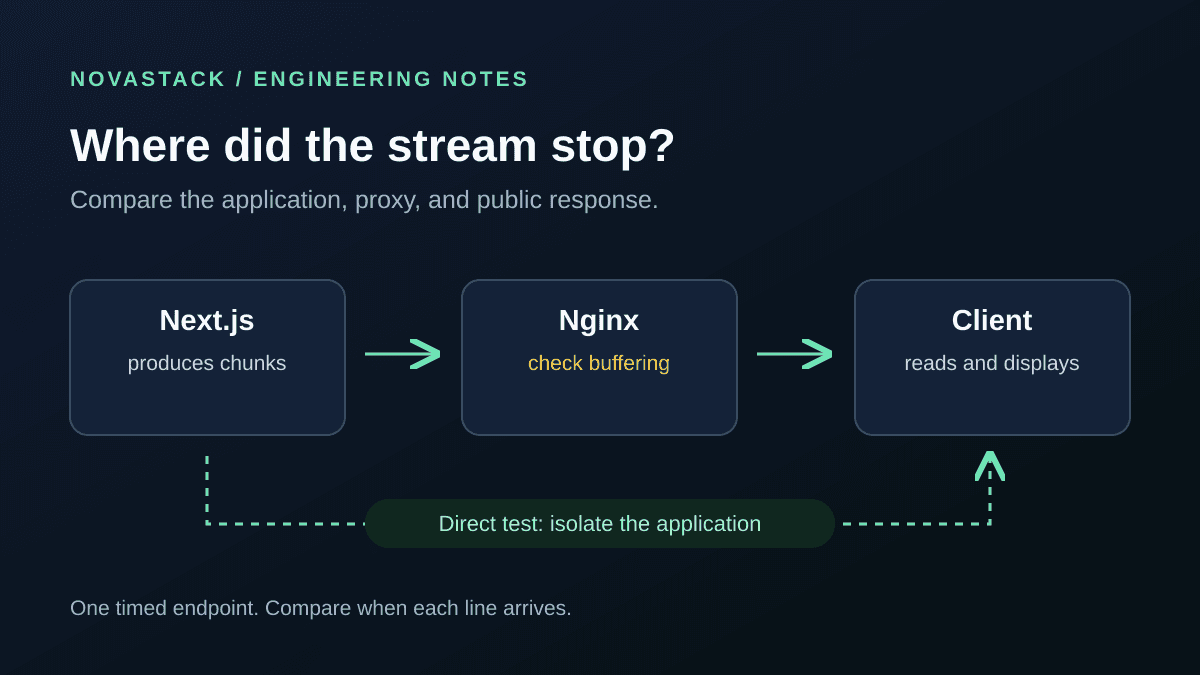
A Next.js response arrives in pieces on your laptop. On the deployed site, nothing appears for several seconds, then everything arrives together. Before rewriting the React component or blaming the model behind an AI chat interface, compare the response at each hop.
Start with the same production build, requested directly and through Nginx. If the direct request streams but the proxied one batches the output, investigate the proxy path. If both batch it, investigate the application first.
This guide is for a self-hosted Next.js App Router app. It extends the basic VPS, PM2, and Nginx setup with a small diagnostic you can remove afterward. You do not need an AI API key, a database, or a real customer request to reproduce the problem.
1. Make a stream with predictable timing
Create app/api/stream-check/route.ts in a local or staging copy of your app. It emits four lines, roughly one second apart, and clears its timer when the response ends or the consumer cancels.
export const runtime = 'nodejs';
export const dynamic = 'force-dynamic';

export function GET() {
  const encoder = new TextEncoder();
  let timer: ReturnType<typeof setInterval> | undefined;

  const stream = new ReadableStream<Uint8Array>({
    start(controller) {
      let count = 0;
      const send = () => {
        count += 1;
        controller.enqueue(
          encoder.encode(`chunk ${count}: ${new Date().toISOString()}\n`)
        );
        if (count === 4) {
          clearInterval(timer);
          controller.close();
        }
      };
      send();
      timer = setInterval(send, 1000);
    },
    cancel() {
      clearInterval(timer);
    },
  });

  return new Response(stream, {
    headers: {
      'Content-Type': 'text/plain; charset=utf-8',
      'Cache-Control': 'no-store, no-transform',
    },
  });
}
The example uses Next.js 15's route configuration and standard Web Streams. It is a diagnostic, not a production event service. The Next.js 15 Route Handler reference explains returning a stream in a Response.
Build and run the test app in production mode, bound to loopback:
npm run build
npm run start -- --hostname 127.0.0.1 --port 3000
Run this on a machine where port 3000 is free. Do not stop an existing production process to make room for a diagnostic.
2. Compare arrival times, not just timestamps in the body
In another terminal on that machine:
curl --no-buffer --silent --show-error \
  --header 'Accept-Encoding: identity' \
  http://127.0.0.1:3000/api/stream-check
Deploy the same diagnostic build to staging and confirm Nginx forwards to the process and port running it. Then request that route through your staging domain:
curl --no-buffer --silent --show-error \
  --header 'Accept-Encoding: identity' \
  https://staging.example.com/api/stream-check
Replace the example domain with yours. The first line should appear promptly and the remaining lines should appear separately over about three seconds. A slow connection can change the exact spacing.
The embedded timestamps show when the server produced each line. They do not prove when the client received it. Four old timestamps appearing together are still a delayed stream. Add --trace-time --trace-ascii stream-trace.txt to record receive timing if watching the terminal is inconclusive. Use synthetic data: curl traces may contain request headers and response bodies, so do not share traces from authenticated customer traffic without redaction.
curl's --no-buffer option disables its own output buffering. It cannot instruct Nginx or a CDN to flush. Requesting identity also makes this first comparison easier by taking negotiated compression out of the test.
| Observation | Next check |
|---|---|
| Both requests deliver lines gradually | Test the real page or client code; the simple transport path works. |
| Direct request is gradual; staging batches lines | Compare Nginx locally, then any CDN or load balancer in front of it. |
| Both requests batch lines | Check that this route is running and that the application returns the stream before waiting for all work. |
| The response stops partway through | Inspect application errors, disconnects, and idle timeouts rather than assuming buffering. |
Use curl -i if you are unsure the response is even the diagnostic. A redirect, login page, or 404 is not a streaming result.
What the local test actually showed
For this article, the exact route above was built with Next.js 15.5.26 and Node.js 24.22.1, then requested through a local Nginx 1.30.6 proxy without TLS, a CDN, or compression. These are elapsed seconds when curl received each line, rounded to two decimals:
| Test path | Line 1 | Line 2 | Line 3 | Line 4 |
|---|---|---|---|---|
| Direct to Next.js | 0.04 | 1.03 | 2.03 | 3.04 |
| Nginx, buffering on | 0.02 | 1.03 | 2.02 | 3.03 |
| Nginx, buffering off | 0.02 | 1.02 | 2.02 | 3.02 |
All three paths streamed this small response. Enabling buffering does not mean every response will be held until completion. This test validates the probe, not a claim that the default setting always reproduces the problem. If it passes but your real response still batches, compare that response's size, headers, compression, and full network path before changing configuration. These timings are one local run, not a performance benchmark or a production incident.
3. Change the matching Nginx location
Nginx enables response buffering by default. Its proxy_buffering documentation describes both the location directive and the upstream X-Accel-Buffering response header.
For an initial staging test, use an exact location inside the existing server block:
location = /api/stream-check {
    proxy_pass http://127.0.0.1:3000;
    proxy_http_version 1.1;
    proxy_set_header Host $host;
    proxy_set_header X-Forwarded-Proto $scheme;
    proxy_buffering off;
}
Keep any authentication, access restrictions, and other required proxy settings from your existing setup. This is not a complete server or TLS configuration. An exact location also will not inherit directives from a sibling location / block.
Validate the configuration before reloading. On a systemd-based server with a service named nginx:
sudo nginx -t && sudo systemctl reload nginx
The Nginx configuration guide covers applying changes and graceful reloads. If validation fails, fix the reported error instead of restarting the service blindly. Repeat the two curl requests after the reload.
Once the test identifies the problem, apply the setting to the routes that actually need streaming. Do not change every route merely because the diagnostic worked.
Let the application opt out instead
If different responses share one proxy location, add this header to the streaming response's headers object:
'X-Accel-Buffering': 'no',
Set it on the upstream application response, not on the curl request. Nginx can be configured to ignore it with proxy_ignore_headers, so inspect the active configuration if it has no effect. Nginx normally hides X-Accel-* headers from downstream clients; not seeing this header in the public response does not establish that the app failed to send it.
proxy_request_buffering controls the incoming request body. Turning it off is not the fix for a delayed response. Increasing proxy_read_timeout addresses idle gaps, not batched delivery.
4. Keep the transport test separate from the UI test
After the synthetic stream works, test the original feature again.
- A fetch-based client: if the code calls
await response.text()orawait response.json()before updating the screen, it waits for the complete body. A streaming client needs to consumeresponse.bodyincrementally and handle partial records. See MDN onResponse.text()and stream readers. - A server-rendered page: this plain-text route does not test where your Suspense boundaries sit, when a component starts its work, or when the browser paints the HTML.
- A CDN or another proxy: repeat the test through each supported staging path. Fixing one Nginx hop does not prove the public path streams. Keep origin ports private and do not bypass TLS verification to test an origin.
Next.js's self-hosting guidance on streaming calls out the need for end-to-end support across proxies and load balancers. Treat the public URL as a separate acceptance test.
For a reproducible result, record the application version, Nginx version, request path, and line arrival times before and after the change. Test with normal browser compression settings afterward too; the identity-encoding diagnostic deliberately narrows the problem.
A short release checklist
- The direct production-mode request emits lines separately.
- The staging proxy request does too, with the intended location and headers.
- The real UI displays partial output rather than waiting for the whole body.
- Existing access controls and non-streaming routes still behave correctly.
- Disconnects and a deliberately slow response do not leave avoidable work running.
- The temporary diagnostic route and test-only location are removed when finished.
Keep the first fix small. One timed endpoint and two comparable requests are usually more informative than changing the framework, proxy, and client at the same time.


