Next.js Sitemap Not Updating? Trace the Publish Path
A new post is live but missing from sitemap.xml. Separate content, build, caching and indexing problems with a reproducible production checklist.
A new blog post loads in your browser, but /sitemap.xml does not list it. Or the sitemap lists it correctly and Google still does not show the page. These are different problems. Repeatedly submitting the sitemap will not repair a stale deployment, and changing cache settings will not guarantee indexing.
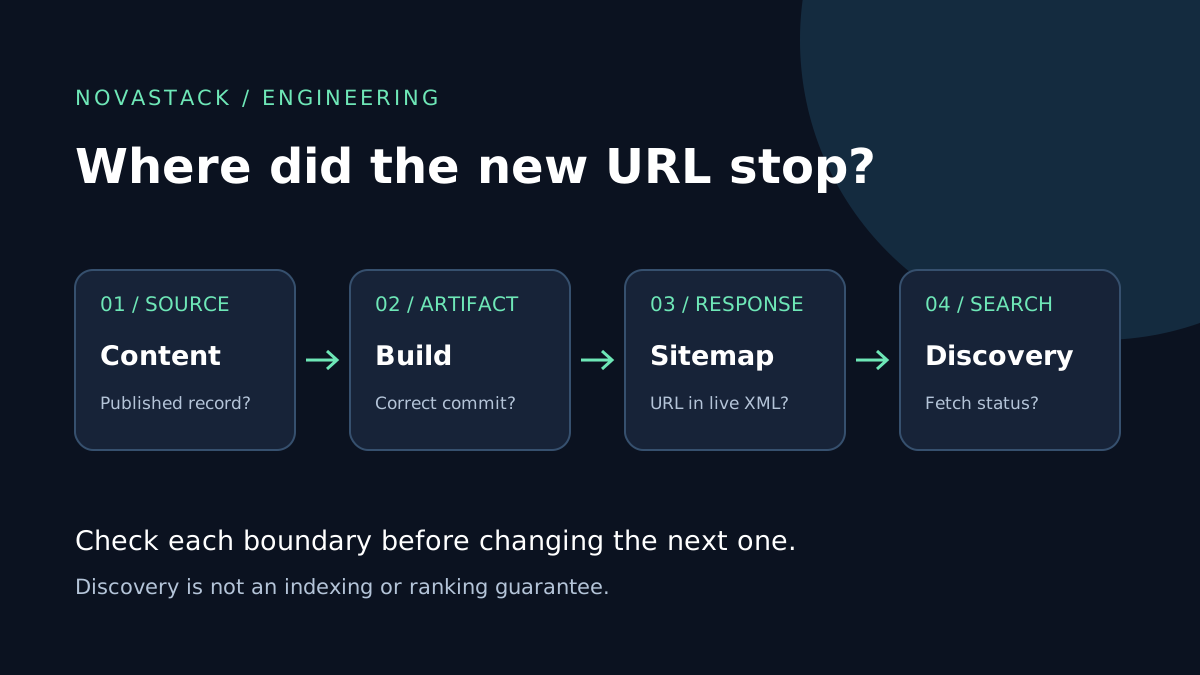
Start with one exact URL and follow it from the content source to the public response. This guide focuses on the Next.js App Router. The examples are for a small, repository-backed blog; CMS publishing also requires checking how remote changes reach the sitemap.
First identify which result is missing
| Observation | Check next | Avoid doing first |
|---|---|---|
| New page and sitemap entry are both absent | Branch, deployment commit and content eligibility | Changing SEO metadata |
| Page exists but sitemap entry does not | Sitemap's content query, filters and freshness | Resubmitting unchanged XML |
| Entry exists but points to a preview host or redirect | Production origin and canonical URL generation | Adding more URL variants |
| Entry and page are correct but Search Console has an older read | Search Console's last-read and processing details | Deploying cosmetic changes every day |
| Google knows the URL but has not indexed it | URL Inspection and the page's eligibility/content | Treating sitemap inclusion as an indexing promise |
Google describes sitemaps as a discovery aid, not a guarantee of crawling or indexing. Keep an internal link from a relevant page as well. A sitemap should not be the only path readers have to the article.
1. Verify the source used by the sitemap
Open app/sitemap.ts and find where its list of pages comes from. Does it read the same published posts as your blog listing, or a second hand-maintained array?
For a repository-backed MDX blog, inspect these inputs:
- The file is committed to the branch deployed to production, not just saved locally.
- Its extension and directory match the loader's filters.
- Frontmatter parses successfully and the post is not marked as a draft.
- Any date or locale filters include the post intentionally.
- The slug generated by the loader matches the actual route.
For a CMS, also check pagination and publication status. A query that returns only the first page of records can produce perfectly valid but incomplete XML. Check the deployed environment's content configuration without printing credentials into logs.
Do not solve a missing draft by removing publication filters globally. Fix the one post's eligibility or the incorrect filter. If you are still deciding how content should enter the site, see MDX versus a headless CMS.
2. Separate a new build from a fresh content fetch
Repository content and remote content have different publishing paths.
Files included in a deployment: If your sitemap reads MDX files during the build, publishing a file normally requires a new build containing it. An older running deployment cannot read a commit that was never included in its artifact. First confirm the production deployment's commit SHA.
Content fetched from a CMS: Publishing in the CMS does not, by itself, tell you when the site's sitemap refreshes. Trace both the content fetch and the generated route. A webhook, scheduled rebuild or supported revalidation strategy needs to cover the sitemap as well as the article and listing.
The Next.js sitemap reference documents sitemap.ts as a special route and says it is cached by default unless request-time APIs or dynamic configuration are used. Do not assume advice about ordinary GET route handlers applies unchanged to metadata routes.
Check the docs for your installed Next.js version and configuration before adding a caching flag. Test a production build, not only next dev. Changing everything to dynamic rendering can add runtime work while leaving an incorrect content query untouched.
3. Keep URL generation small and explicit
Here is a minimal typed example. The records are illustrative; replace them with your application's validated, published content loader. This function does not scan routes or discover new files automatically.
import type { MetadataRoute } from 'next';

const origin = 'https://example.com';
const posts = [
  { slug: 'release-checklist', updated: '2026-11-09' },
];

export default function sitemap(): MetadataRoute.Sitemap {
  return [
    { url: `${origin}/blog` },
    ...posts.map((post) => ({
      url: new URL(`/blog/${post.slug}`, origin).href,
      lastModified: post.updated,
    })),
  ];
}
Use your public canonical origin, not a preview deployment address. Confirm that each intended URL serves the correct page and that its canonical agrees with that choice. For multiple languages, do not collapse distinct translated pages into a single entry; review your bilingual URL and canonical strategy.
A reliable lastModified comes from a meaningful content change, not the clock at build time. If you do not track an accurate modification date, omit it rather than make every unchanged page appear newly edited. Preserve the original publication date separately.
Google's sitemap guidance calls for absolute URLs and accurate significant-update dates. It also says Google ignores priority and changefreq. Raising their values is not a refresh mechanism or a ranking improvement.
4. Inspect the public response, not just the source file
After deploying, run these read-only checks against your own domain. Replace the example host and slug first:
curl -sS -D /tmp/sitemap-headers.txt \
  https://example.com/sitemap.xml -o /tmp/sitemap.xml

cat /tmp/sitemap-headers.txt
grep -F 'https://example.com/blog/release-checklist' /tmp/sitemap.xml

curl -sS -o /dev/null -w '%{http_code}\n' \
  https://example.com/blog/release-checklist
Expect a successful sitemap response containing XML, not a sign-in page or an HTML error with a 200 status. The grep check only proves that text exists; it is not an XML validator. If the first request redirects, inspect the destination before following it. Check the XML with an XML parser and inspect the page's canonical and indexing directives too.
For a sitemap index, follow the relevant child sitemap. Searching only the index for a blog URL will give a misleading negative result. If the XML differs between preview and production, check the commit and environment before assuming Google has cached it.
Build a small release check around the same evidence:
- The expected production commit is deployed successfully.
- The new route returns the intended content without authentication.
- Its canonical uses the intended production URL.
- That URL appears exactly once in the appropriate sitemap.
- The public blog listing or a relevant article links to it.
- Draft, preview and removed URLs have not leaked into the XML.
5. Hand off to Search Console only after production is correct
In the Search Console Sitemaps report, inspect the submitted URL, fetch status and last-read information. If fetching failed, investigate the publicly accessible response before submitting again. Use URL Inspection for the particular article to distinguish a discovery problem from another indexing reason.
A successful sitemap read is not proof that every URL is indexed, and an indexed page is not a promise of search traffic. Keep a dated release note and review a settled reporting period rather than changing titles or content in response to a single quiet day. When comparing later visits, remember that Search Console clicks and GA4 sessions measure different things.
The useful stopping point
You are finished with the publishing repair when the correct production artifact exposes valid XML containing the intended URL, the page is accessible, and its metadata and internal links agree. Record any remaining Search Console issue separately. That boundary prevents a framework bug, a deployment mistake and an indexing decision from turning into one endless "SEO fix."