Why Search Console Clicks and GA4 Sessions Do Not Match
Compare Google search clicks with GA4 sessions using the right scope, dates and URLs. A practical checklist for separating expected differences from tracking and reporting problems.
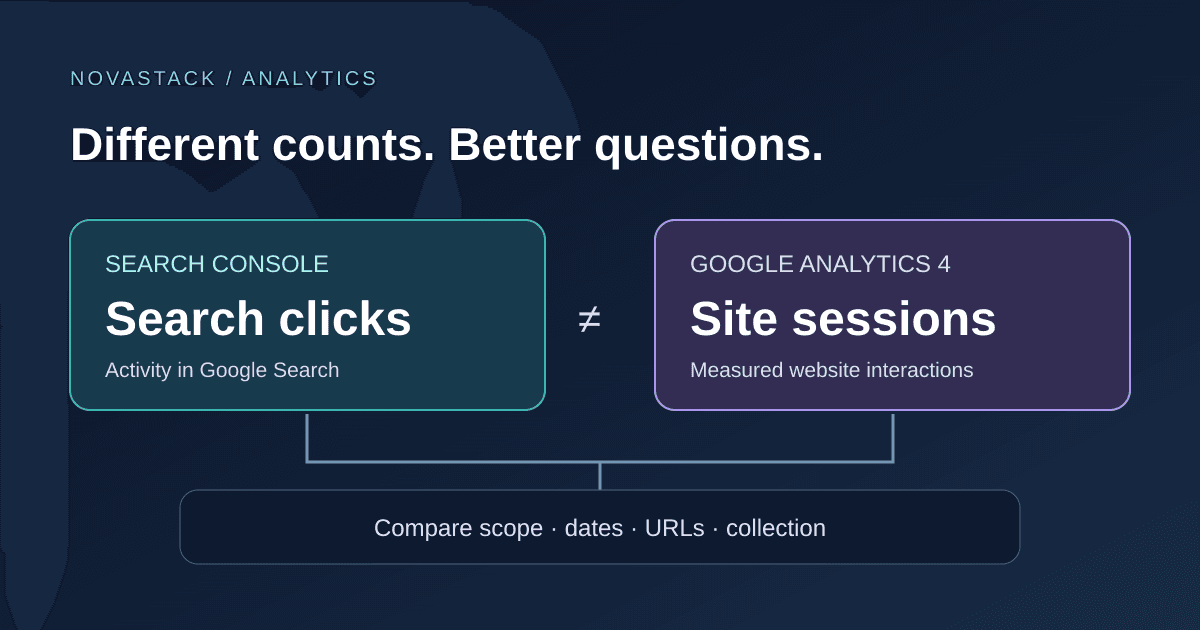
Search Console reports 120 clicks. GA4 reports 160 organic-search sessions. Which number should go in the report?
Keep both, with their definitions. Those illustrative numbers describe different events, and the gap alone does not tell you that tracking is broken. The useful question is whether the comparison is consistent and whether a change in the gap has an identifiable cause.
Start with Search Console Web clicks and GA4 sessions filtered to session source / medium = google / organic, covering the same site and a completed date range. Even then, do not expect exact equality. Google recommends comparing their patterns rather than treating them as interchangeable counts. See Google's guide to using Analytics and Search Console together.
What each number measures
| Metric | What it describes | Useful question |
|---|---|---|
| Search Console clicks | Clicks from Google search results to your site | Are search results bringing people to these pages? |
| GA4 sessions | Periods of measured interaction on your website or app | What happens during visits attributed to this source? |
| GA4 engaged sessions | Sessions that meet GA4's engagement criteria | Are measured visits doing more than immediately leaving? |
A session normally starts when someone visits and no session is active. The default inactivity timeout is 30 minutes. Multiple search clicks can occur during one session, so counting every click as a new visit is unsafe. Session attribution can also credit a later return to an earlier source. Google's session documentation explains the timing and attribution rules.
Do not compare Search Console clicks with GA4 users or page views and call the difference missing visits. Those are different units again.
1. Write down the scope before exporting
Use a small comparison record. It prevents two people from unknowingly answering different questions:
- Search Console property: domain property or exact URL-prefix property.
- Search type: Web, with any country, device, page or query filters recorded.
- GA4 property and web stream: confirm they cover the same production site.
- GA4 metric: Sessions, using session-scoped traffic dimensions.
- GA4 filter:
Session source / mediumequalsgoogle / organic. - Inclusive start/end dates, report timezone and export time.
- Page scope: whole site first, then a small set of landing pages.
Start without a query filter: GA4 cannot reproduce Search Console search-query filtering. If you narrow by country or device, apply the corresponding filter in both products and record any difference in their definitions.
The GA4 Organic Search channel can contain traffic from multiple search engines. Filtering only that channel is broader than Google Search. Also avoid substituting First user source / medium, which describes acquisition of users, for a session-scoped comparison. Google's channel-group documentation distinguishes user, session and event scope.
2. Compare a settled window, not just yesterday
For an initial check, use two comparable 28-day windows ending several days before today. This is a practical starting point, not a universal reporting rule. For a launch or outage, inspect individual days after you establish the baseline.
Search Console's daily reports use Pacific Time outside the 24-hour view. GA4 may use a different property timezone. Matching date labels therefore does not always mean matching the same hours. Record the difference rather than changing a production property's timezone just to make a chart agree.
Fresh data can also be incomplete. Google says Search Console data is usually available after two to three days. Its discrepancy guide covers processing, lag and timezones.
3. Match landing pages, including canonical URLs
Suppose a visitor follows a search result to a URL with a tracking parameter, then lands on the clean page after a redirect. Before joining two exports, check which URL each report credits.
Search Console generally assigns performance to Google's selected canonical URL. GA4 landing-page reporting can represent the visited path differently. Check hostnames, trailing slashes, redirects, parameters and language paths before concluding that a page has clicks but no sessions. Use URL Inspection when the selected canonical is unclear. See Search Console's page grouping rules.
Keep a two-column URL mapping for the few pages under investigation. Do not strip every query parameter from a large dataset without checking whether some parameters identify genuinely different content.
4. Separate expected differences from implementation faults
| Observation | Next check |
|---|---|
| Both trends move together, but counts differ | Confirm scope and document the difference before changing tracking |
| GA4 drops sharply after a release while search clicks stay stable | Test tag loading, consent behavior and page errors on affected templates |
| Only one hostname or locale is missing | Check stream coverage, redirects and tags on that part of the site |
| Native reports look plausible, but a dashboard is missing rows | Check the connector request, pagination, filters and aggregation |
For browser-based GA4 collection, blocking or failing to load the measurement code can prevent observations. Consent settings can also affect what is collected and reported. Treat these as hypotheses to test, not a reason to weaken a visitor's privacy choices. Google lists implementation and collection differences in its cross-product comparison guide.
Reproduce the affected page in a test session, inspect the relevant tag and consent state, and compare an unaffected page. Keep the deployment time with your findings. A ratio cannot identify the broken component for you.
5. Check the connector before diagnosing the audience
A second mismatch can happen inside one data source. A page-only export and a page-plus-device export may return different totals. That is a separate investigation from GA4 versus Search Console.
Try this small audit:
- Save one page-only request and response.
- Repeat with device as the only added dimension.
- Keep property, dates, search type and filters identical.
- Record row limits, pagination and any connector defaults.
- Compare both requests with the corresponding native Search Console views.
Search Console has documented aggregation differences, row limits and omitted anonymized queries. In particular, query-table rows need not sum to the chart total. But that does not prove that query anonymization explains a page-and-device discrepancy. Establish which mechanism applies before accepting the breakdown. Google documents these reporting limits.
Until reconciled, label the affected breakdown incomplete. Do not use it to announce that mobile traffic collapsed, calculate device shares, or prioritize a redesign.
What to put in the final report
Use separate lines for search acquisition and measured website activity. A useful summary might read:
“Google Web clicks increased over the comparison period. GA4 google / organic sessions also increased. Counts differ because the reports measure different activity; the page-level comparison uses matched URLs. The device export remains under investigation and is excluded from device conclusions.”
That is a template, not a result from a client account. Replace it with the evidence you actually have, including a decline or an unresolved tracking problem when relevant.
End with one decision: repair a verified measurement issue, investigate a specific page, or keep observing with a consistent baseline. There is no universal acceptable percentage gap and no reason to multiply one metric to force a match. For the broader reporting process, see turning marketing data into decisions.