Next.js Environment Variables Undefined or Stale After Deployment
Separate build-time browser values from request-time server values, reproduce the difference safely, and diagnose missing environment variables in a deployed Next.js app.
You changed an environment variable, restarted the server, and the browser still shows the old value. Or the same app works with next dev but reports undefined after deployment.
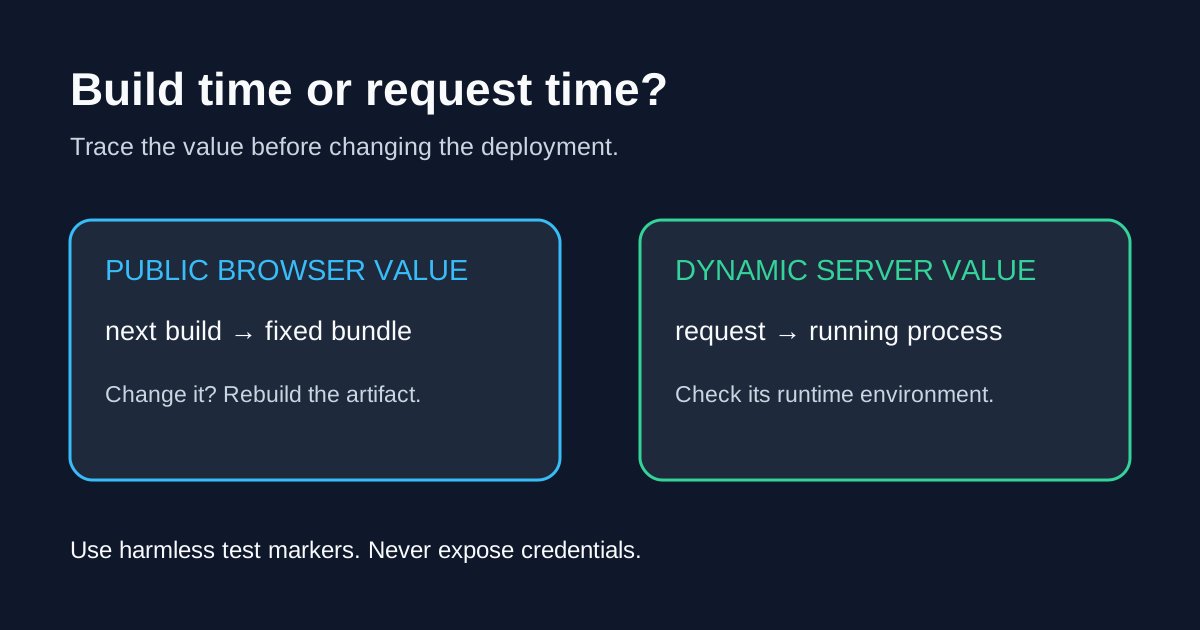
First identify where the value is consumed and when that code executes. A browser bundle, a prerendered page, and a request-time server handler are three different places to investigate. Restarting a process cannot rewrite JavaScript that was already built.
This diagnostic targets a self-hosted Next.js App Router application. The command examples use a POSIX shell. Work in an isolated local or staging copy, not against production secrets.
Choose the right investigation
| Symptom | First check | Likely next action |
|---|---|---|
| Browser shows an old public URL | Value available during next build | Rebuild with the intended public value, then deploy that artifact |
Server code sees undefined | Environment of the actual running process | Supply the variable to that process and restart through its supervisor |
| Server-rendered page stays unchanged | Whether the page was prerendered | Decide whether the value belongs at build time or request time |
Local script misses .env.local | Whether it runs through Next.js | Load configuration explicitly, for example with @next/env |
These are starting points, not proof of the cause. Confirm with a harmless marker before changing deployment architecture.
1. Browser values belong to the build
Next.js replaces direct references such as process.env.NEXT_PUBLIC_RELEASE_LABEL with the value available during compilation. That public value remains in the browser bundle after deployment. A different environment on the machine running the finished build does not update it.
Use the explicit property reference. Computed access such as process.env[key] is not a runtime browser configuration mechanism. Keep .env* files at the project root, including when application code lives under src. See the environment-variable guide for loading rules and standalone scripts.
Do not add NEXT_PUBLIC_ to an API key to fix an undefined value. It makes the value eligible for browser exposure. Also inspect next.config: the legacy env configuration option bundles configured values regardless of their prefix. A private-looking name is not a security boundary there.
2. Reproduce the two phases without secrets
The sample was verified with a Next.js 15.5.26 production build and the Node.js runtime; Cache Components was not enabled. In Next.js 16, enabling Cache Components removes the dynamic route option used here. Adapt the example using the current route configuration documentation, or run it in a separate compatible test app. Do not disable production caching just to follow this diagnostic.
Create this temporary route at app/api/env-check/route.ts, or src/app/api/env-check/route.ts when using src:
export const runtime = 'nodejs';
export const dynamic = 'force-dynamic';

export function GET() {
  return Response.json({
    publicBuildMarker: process.env.NEXT_PUBLIC_RELEASE_LABEL ?? 'missing',
    serverRuntimeMarker: process.env.DEMO_RUNTIME_LABEL ?? 'missing',
  }, { headers: { 'Cache-Control': 'no-store' } });
}
Both markers below are deliberately non-sensitive. This endpoint returns them to anyone who can reach it. Never substitute a credential, customer identifier, or your real environment dump.
Stop any existing development server, then run:
NEXT_PUBLIC_RELEASE_LABEL=build-A DEMO_RUNTIME_LABEL=build-A npm run build
NEXT_PUBLIC_RELEASE_LABEL=runtime-B DEMO_RUNTIME_LABEL=runtime-B npm run start -- --port 3100
In another terminal:
curl -sS http://localhost:3100/api/env-check
In that test, the result was publicBuildMarker equal to build-A and serverRuntimeMarker equal to runtime-B. The route deliberately runs dynamically: it isolates environment timing from page prerendering. Remove the route after the experiment and rebuild before deploying your normal application.
If the result differs, check that port 3100 is served by the process you just started, that the build succeeded, and that no supervisor is starting a different directory or artifact. Do not begin by deleting unrelated caches or changing every variable name.
3. A server component is not automatically request-time
Server-only execution does not imply execution on every request. A page can be prerendered. If an environment-dependent page genuinely needs request-time rendering, current Next.js supports calling await connection() before the read to exclude subsequent work from prerendering. Check compatibility with your installed Next.js version and rendering configuration before adopting it.
Keep private reads on the server. Passing a secret as a prop to a Client Component still exposes it. The server/client boundary guide explains how server-only can help detect accidental imports. It does not prevent you from deliberately returning a secret in a response.
4. Follow the value through deployment
For a VPS, distinguish your interactive shell from the environment supplied by PM2, systemd, or another supervisor. Check the launch directory and configured environment without printing credentials. After changing that configuration, use the supervisor's documented reload or restart procedure. Then request the actual deployed endpoint, not a second local server.
For containers, ask two separate questions: was a public value available in the build stage, and was a private runtime value supplied to the running container? Docker ARG and ENV have different scopes; neither is an appropriate way to pass build secrets. Use supported secret mounts when a build truly needs a credential.
Next.js's self-hosting guide distinguishes fixed public configuration from dynamic server reads. If one image must serve multiple environments, keep public configuration fixed per build or design an explicit, allowlisted runtime configuration response. Never serialize all of process.env to the client.
Finish with a small verification record
Record the deployment identifier, expected non-sensitive marker, observed result, and whether the fix required a rebuild or process restart. If an old browser value remains after deploying the correct artifact, compare the HTML and loaded asset URLs with that deployment before blaming environment loading.
For the surrounding deployment setup, see Next.js on a VPS. If values are correct but responses arrive all at once, use the separate Nginx streaming diagnostic.